
MyFitnessPal Vs. WhatTheFood: Which Macro Tracker is Best?
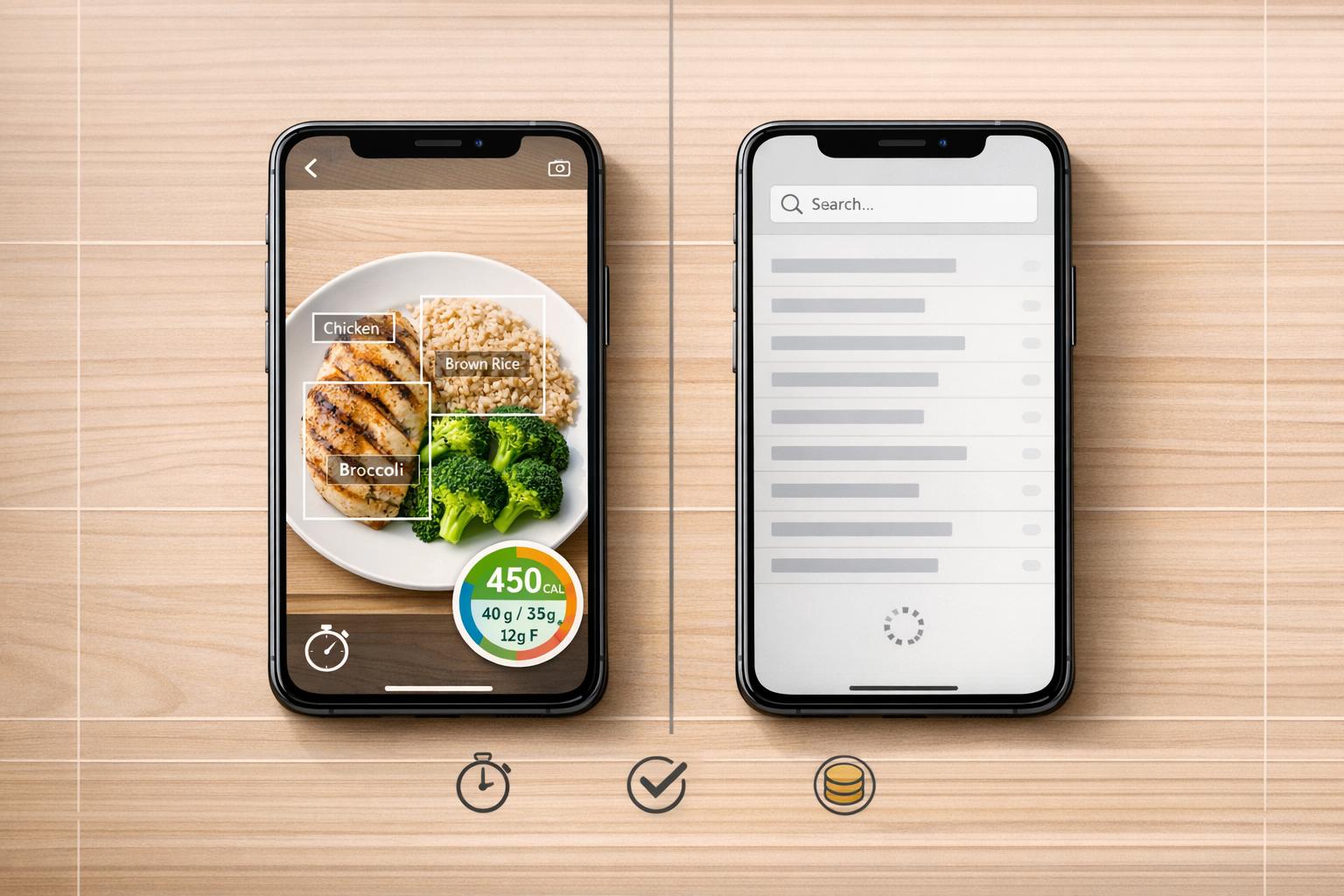
MyFitnessPal Vs. WhatTheFood: Which Macro Tracker is Best?
When choosing a macro tracker, it comes down to MyFitnessPal and WhatTheFood, each offering distinct features:
- MyFitnessPal: Known for its massive database (20.5M+ foods) and wearable integrations (40+ devices). It’s great for manual logging but has accuracy issues with user-submitted entries. Many features, like barcode scanning and custom macro goals, are locked behind a $19.99/month Premium subscription.
- WhatTheFood: Uses AI to analyze meal photos for quick macro tracking. It’s faster and more accurate (up to 97%) for simple meals but struggles with complex dishes. Free tier includes AI scanning, while Premium ($9.99/month) adds unlimited scans and professional tools.
Quick Comparison
| Feature | MyFitnessPal | WhatTheFood |
|---|---|---|
| Input Method | Manual search/barcode | AI photo analysis |
| Free Plan Features | Limited | AI scanning included |
| Premium Cost | $19.99/month | $9.99/month |
| Accuracy (Common Foods) | ±6.8% error rate | Up to 97% |
| Accuracy (Complex Dishes) | Lower for user entries | Drops for layered meals |
| B2B Tools | Not available | Available |
If you prefer manual control and a large database, MyFitnessPal is a solid choice. For faster, AI-driven tracking with better free features, WhatTheFood stands out.
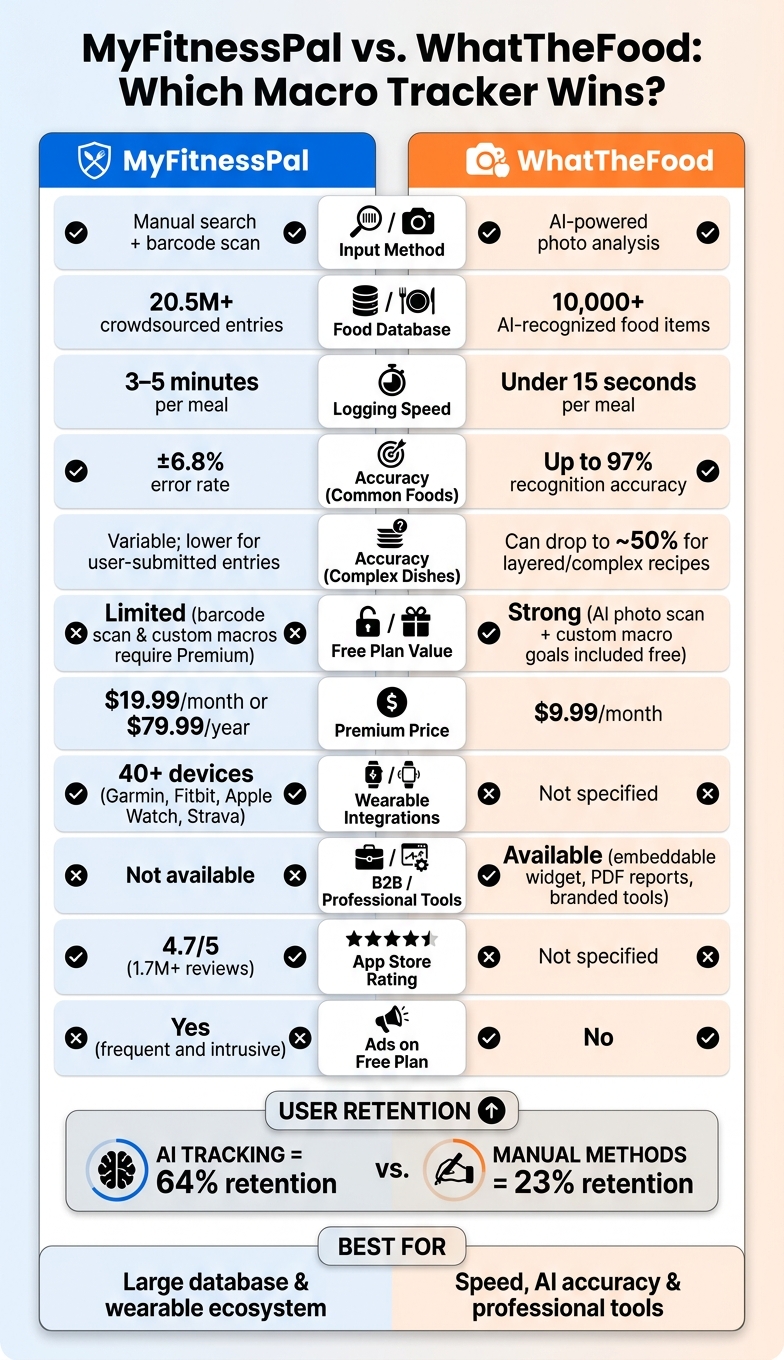
MyFitnessPal vs. WhatTheFood: Full Feature & Pricing Comparison
MyFitnessPal: Features, Pros, and Cons
Core Features of MyFitnessPal
MyFitnessPal boasts a massive food database with over 20.5 million entries, covering everything from fast food to local grocery items. It also integrates seamlessly with 50+ third-party platforms, such as Garmin, Apple Watch, Fitbit, and Strava, allowing automatic updates to your daily nutrition goals based on activity data. While both free and paid tiers offer macro customization, features like gram-level targets and "Net Carbs" mode (ideal for keto and low-carb diets) are locked behind the Premium subscription, priced at $19.99/month or $79.99/year. Let’s explore what makes MyFitnessPal a popular choice for many users.
What MyFitnessPal Does Well
The size of the food database is a standout feature. Whether you’re dining at chain restaurants, experimenting with international recipes, or frequently on the go, chances are high that you’ll find the exact food you’re searching for. The barcode scanner is another highlight, offering a 94% success rate across 200 tested products.
Another strong point is its ecosystem connectivity. MyFitnessPal syncs with devices like Fitbit and Apple Watch, automatically adjusting your macro goals based on your activity levels. Plus, the availability of a full web interface makes logging on a desktop easy, a feature often missing in newer apps.
"MyFitnessPal remains the most practical choice for users who prioritize database breadth and ecosystem connectivity over nutritional depth." - Emily Rodriguez, Reviewer
However, despite these strengths, the app has its shortcomings.
Where MyFitnessPal Falls Short
The sheer size of the database comes with a downside: accuracy. Since most entries are user-submitted, quality can vary significantly. A 2024 peer-reviewed study revealed that 37% of popular food entries in crowdsourced databases like MyFitnessPal had energy value errors exceeding 20%. While verified entries are marked with green checkmarks, the majority of the database remains unchecked, which can undermine precise macro tracking.
Some essential features now require a Premium subscription, including the barcode scanner - previously free - and gram-level macro goals, which are crucial for users serious about tracking their nutrition.
"I have stopped recommending it to new patients who are starting from scratch. The database quality issues are too variable for clinical dietary assessment." - Registered Dietitian, Outpatient Clinical Practice
Additionally, reviewers in 2026 have noted that MyFitnessPal has shown little evolution compared to newer, AI-driven tools. Free-tier users also face frequent, intrusive ads, which can detract from the overall experience.
sbb-itb-034be4e
WhatTheFood: Features, Pros, and Cons
Switching from manual logging to AI-powered tracking, WhatTheFood offers a modern and efficient way to manage your nutrition.
Core Features of WhatTheFood
WhatTheFood uses AI to simplify macro tracking. Instead of searching for foods in a database, you just snap a photo of your meal, and the app’s AI takes care of the rest. Its scanner can identify over 10,000 food items and provides a detailed macro breakdown - calories, protein, carbs, and fat - in just 7 to 12 seconds.
The app goes beyond simple food recognition. It can analyze complex, multi-ingredient meals and even create step-by-step cooking instructions from a single photo. For those following specific diets, it includes a customizable keto and low-carb meal planner designed to align with your goals.
For professionals, the Premium plan ($9.99/month) unlocks additional tools like a customizable widget that nutritionists and food bloggers can embed on their websites. This feature requires no technical expertise and allows for instant nutritional analysis directly on their platforms. Premium users also gain access to PDF reports, which are perfect for sharing with clients. These B2B tools make it easier for professionals to engage with their audience and clients effectively.
What WhatTheFood Does Well
The app shines in its speed and ease of use. There’s no need for manual input or guesswork. The AI estimates portion sizes from your photos and cross-checks its findings against verified food databases, achieving a 98% nutrient confidence level. This level of accuracy is particularly valuable for users who need dependable, real-time insights.
Studies suggest AI tracking can improve adherence to dietary goals, with a 64% retention rate compared to just 23% for manual methods. In short, people are more likely to stick with it.
"The accuracy and clarity help our athletes understand what fuels their performance. It's like having a dietitian assistant available 24/7." - Gemma Ray, RDN, Sports Nutrition Partner
The B2B features are another standout. Nutritionists can generate branded PDF reports for their clients, while food bloggers can integrate the AI scanner widget into their sites to provide instant nutritional insights - all while keeping their branding front and center. These tools make it a versatile option for professionals looking to add value for their audience.
Where WhatTheFood Falls Short
The free plan is quite limited, offering only three scans total (or three days of use). It also lacks some essential features like scan history and a serving size adjuster, which are important for consistent tracking over time.
Accuracy can vary depending on the type of meal. The AI is most reliable with restaurant dishes and simpler meals, achieving up to 97% recognition accuracy. However, for more complex homemade recipes - especially those with layered sauces or hidden ingredients - accuracy can drop to around 50%. While clear and well-lit photos can improve results, they don’t completely solve the challenge for intricate dishes.
Ready to simplify your macro tracking? Visit whatthefood.io and see how it works for yourself.
Food Recognition and Tracking Accuracy: A Direct Comparison
Database Entries vs. AI Image Analysis
The way food data is logged can make or break a macro tracker’s accuracy. MyFitnessPal relies on a massive, crowdsourced database of over 14 million entries. Users input data by manually searching for foods, scanning barcodes, or creating custom recipes by adding ingredients one by one. In contrast, WhatTheFood takes a more modern approach, using AI-powered photo analysis to log food in less than 15 seconds.
For MyFitnessPal users, manual entry can take 3–5 minutes per meal, which adds up quickly on a busy day. WhatTheFood’s AI system is designed to handle real-world meals, from restaurant dishes to homemade meals without nutrition labels, making it a faster and more seamless option. Beyond speed, WhatTheFood’s AI provides more consistent results, which is particularly appealing for professionals using its B2B tools or embeddable widgets. This difference in input methods directly affects how accurately macros are calculated, which is critical for anyone serious about tracking their nutrition.
How Accurate Are the Macro Calculations?
When it comes to accuracy, the platforms show a clear divide. Crowdsourced databases, like those used by MyFitnessPal, are prone to errors. Studies show that 37% of popular entries in these databases have energy value errors exceeding 20%. MyFitnessPal itself had a mean absolute percentage error of ±6.8% during 2026 testing, marking it as one of the least accurate apps in its category.
"Accuracy is better for packaged foods logged via barcode scanner... The accuracy problem is concentrated in manually entered items, restaurant dishes, and home-cooked recipes." - Calorie-Trackers.com
On the other hand, WhatTheFood’s AI-driven system provides a more dependable solution for everyday meals, boasting up to 97% recognition accuracy for restaurant and home-cooked dishes. However, the system isn’t perfect - accuracy can dip when dealing with complex recipes where ingredients overlap or are layered.
Here’s a quick comparison of the two platforms:
| MyFitnessPal | WhatTheFood | |
|---|---|---|
| Primary Input Method | Manual search / Barcode scan | AI photo analysis |
| Logging Speed | 3–5 minutes (manual entry) | Under 15 seconds (photo) |
| Accuracy (Common Foods) | ±6.8% error rate | Up to 97% recognition accuracy |
| Accuracy (Complex Dishes) | Variable; often lower with user-submitted data | Can drop for complex, layered recipes |
| Data Source | 14M+ crowdsourced entries | AI estimation with verified databases |
User Experience and Accessibility
When it comes to macro tracking, user experience plays a huge role. If an app is easy to use, you're more likely to stick with it.
How Easy Is Each App to Use Daily?
MyFitnessPal keeps things simple, letting users log meals in just a few minutes. Thanks to its straightforward layout, dietitians often recommend it to beginners who want a no-fuss experience. However, some longtime users feel the interface could use a refresh.
Logging meals does take a few steps, but features like "Quick Add" and a memory for frequently logged foods help speed things up. That said, the barcode scanner - a major time-saver - is locked behind a paid subscription, leaving free users to rely on manual entries.
WhatTheFood takes a completely different approach. Instead of navigating menus, you just snap a photo of your meal, and its AI handles the rest. This streamlined process is perfect for people who find traditional food logging too time-consuming. Nutritionists and food bloggers also appreciate its speed and accuracy.
Both apps aim to make tracking as seamless as possible, backed by solid platform compatibility.
Device and Platform Availability
MyFitnessPal is available on both mobile and web platforms, with impressive support for over 40 wearables like Garmin, Fitbit, Apple Watch, Strava, and Withings.
Here’s a quick look at how the two apps compare:
| Feature | MyFitnessPal | WhatTheFood |
|---|---|---|
| Mobile App | iOS & Android | iOS & Android |
| Web Version | Yes | Yes |
| Wearable Integrations | 40+ devices | Not specified |
| Barcode Scanner | Premium | AI photo scan (free tier available) |
| App Store Rating | 4.7/5 (1.7M+ reviews) | - |
WhatTheFood also runs on iOS and Android, with web access included. Its standout feature is the AI-powered photo scan, which eliminates the need for manual food logging. This makes it an incredibly fast and efficient option.
With usability and accessibility covered, the next step is evaluating the apps' value and accuracy in tracking macros.
Experience hassle-free macro tracking - check out WhatTheFood at whatthefood.io.
Pricing and Value
Pricing plays a key role in how users perceive and access value.
MyFitnessPal: Pricing Breakdown
As of 2026, MyFitnessPal offers three subscription tiers: Free, Premium, and Premium+. The free plan includes basic calorie logging, but features like barcode scanning and custom macro goal-setting require a paid subscription. MyFitnessPal Premium is priced at $19.99 per month, making it one of the more expensive options in this space. Over time, this pricing model has faced criticism, especially as the free version has become more restrictive and cluttered with ads.
WhatTheFood: Pricing Breakdown
In contrast, WhatTheFood keeps things simple with its pricing. The free plan includes AI-powered food detection, calorie counting, macro tracking, and even recipe generation - all without requiring a credit card. While the free tier limits daily analyses, the core features remain intact. Upgrading to the Premium plan unlocks unlimited analyses and extra tools, such as a customizable embeddable widget designed for professionals like nutritionists and food bloggers.

Which App Gives You More for Your Money?
When comparing the two, WhatTheFood's free plan offers more functionality from the start. MyFitnessPal's free tier, on the other hand, has been scaled back significantly since 2022, with previously free tools like the barcode scanner now locked behind a paywall.
Here's a side-by-side look at what the free plans offer:
| Feature | MyFitnessPal Free | WhatTheFood Free |
|---|---|---|
| Basic calorie tracking | ✅ | ✅ |
| Custom macro goals | ❌ (Premium only) | ✅ |
| Barcode / photo scanning | ❌ (Premium only) | ✅ (AI photo scan) |
| Ads | Yes | - |
| B2B widget / embed | ❌ | ✅ |
| Monthly Cost | $19.99/month | Not specified |
For professionals like nutritionists and food bloggers, WhatTheFood stands out with its embeddable widget - a feature completely missing from MyFitnessPal.
🚀 Want smarter tracking without the hefty price tag? Check out WhatTheFood for free at whatthefood.io and see how AI can transform your tracking experience.
Conclusion: Which Macro Tracker Should You Use?
Key Differences Between the Two Apps
Here’s a quick breakdown of how MyFitnessPal and WhatTheFood stack up against each other:
| Feature | MyFitnessPal | WhatTheFood |
|---|---|---|
| Method | Manual search and barcode scan | AI-powered photo recognition |
| Free Plan Usefulness | Limited (features like barcode scanning and custom goals require Premium) | Strong (full AI scan and custom goals are free) |
| B2B Tools | Not available | Available |
| Premium Pricing | Approximately $79.99/year (around $6.67/month when billed annually) | Core features remain free |
🎯 Want a more intuitive way to track your nutrition? Try WhatTheFood for free at whatthefood.io - no credit card required!
Which App Is Right for You?
The best choice comes down to your personal needs. If you’re a fitness enthusiast who appreciates a large food database and active community features, MyFitnessPal might still be appealing. However, keep in mind that many of its advanced tools require a yearly subscription.
On the other hand, WhatTheFood caters to both casual users and professionals with its free AI-powered photo recognition, customizable macro tracking, and business-friendly tools like an embeddable widget. It’s a fast, accurate, and cost-efficient option, especially for nutrition experts looking for B2B capabilities.
🎯 Ready to track smarter? Head to whatthefood.io and start for free - no credit card needed!
FAQs
How can I get the most accurate results from meal photos?
For the best results when analyzing meal photos, turn to AI-driven tools like What The Food, which boasts an impressive 98% accuracy rate for identifying common foods. To maximize precision, always take photos in good lighting - this small step can make a big difference. For more intricate meals, consider pairing photo recognition with barcode scanning and manual input. Remember, clear and well-lit images are essential for dependable analysis.
What kinds of meals are hardest for AI to track correctly?
AI faces the biggest hurdles when dealing with meals that include a mix of complex ingredients or visually similar components. Think of dishes like salads loaded with various items, casseroles, or foods with slight visual differences, such as different types of bread. These difficulties grow even more pronounced under poor lighting conditions or when the food presentation is inconsistent, as it becomes tougher for AI to distinguish individual ingredients and correctly gauge portion sizes.
How does the embeddable widget work for nutritionists and bloggers?
The WhatTheFood embeddable widget is a handy tool for nutritionists and food bloggers looking to add AI-powered food scanning and nutritional analysis to their websites or apps. With this widget, users can upload images of their meals, and the AI instantly breaks down macros and calorie counts. Plus, it’s fully customizable to align with your branding, creating a seamless way to boost engagement while delivering quick and precise nutritional insights.
Related Posts
Beginner's Guide to AI-Powered Macro Tracking
Estimate calories, protein, carbs, and fat from meal photos; fix portions and hidden fats, and track weekly trends with AI-assisted logging.
Manual vs AI Food Tracking: Which Method Works Better?
Manual tracking gives near-exact calories; AI photo logging is faster and boosts consistency—often a hybrid approach works best.
How Many Calories Are in a Slice of Pizza?
Typical cheese slice ≈285 kcal; slices range 170–700+. Size, crust, cheese, toppings and sodium drive the calorie difference.
How Many Calories Are in Common Fruits? A Complete Guide
Calories in common fruits by serving and per 100 g, plus tracking tips, dried fruit and avocado calorie differences.