
Beginner's Guide to AI-Powered Macro Tracking
Beginner's Guide to AI-Powered Macro Tracking
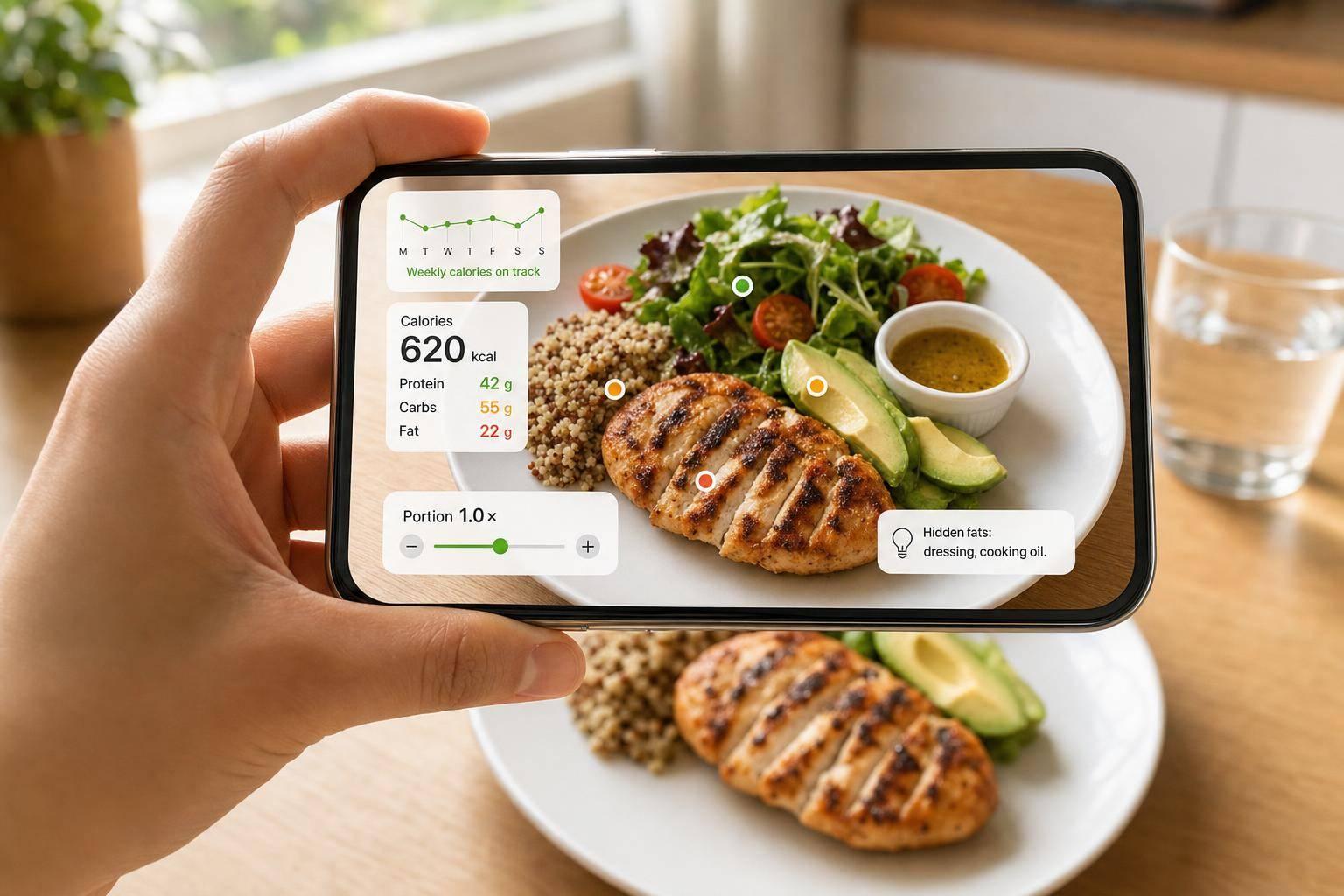
AI macro tracking is a fast way for me to estimate calories, protein, carbs, and fat from a meal photo. It works best when I use it for trends, not perfect numbers.
Here’s the short version:
- I use photo logging for cooked meals and barcode scanning for packaged foods.
- I expect simple meals to be off by about 10% to 15%.
- I expect mixed meals, like burritos or stews, to be off by about 25% to 35%.
- I check portion size first, because that is where many errors happen.
- I add hidden items by hand, like oil, butter, dressing, and sauces.
- I review my weekly average, not one meal or one day.
- I keep 3 to 5 repeat meals that are easy to log and easy to follow.
A few numbers matter right away. A half-cup of cooked rice can shift a log by about 100 calories. And 1 tbsp of olive oil adds about 120 calories. So even if the photo scan gets the foods right, the total can still be off if the portion or added fat is missed.
If I’m new to macro tracking, my best move is simple: set calories, set protein first, scan meals, fix the obvious misses, and watch the week-to-week pattern. That gives me a way to eat with more awareness without logging every bite by hand.
This article walks through the full process in a beginner-friendly way.
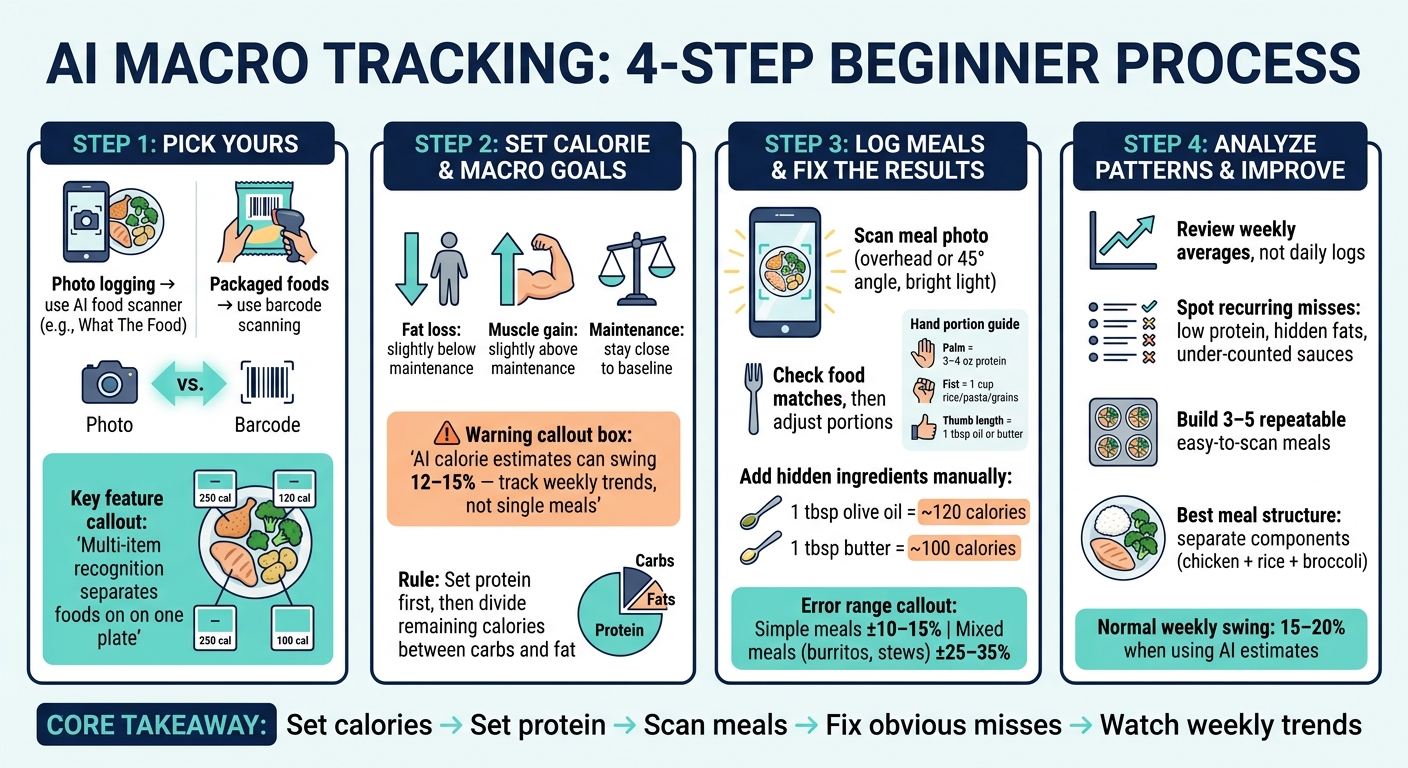
AI Macro Tracking: 4-Step Beginner Process with Error Ranges
I Tested AI Calorie Scanners… Most Were WRONG
sbb-itb-034be4e
Step 1: Pick a Beginner-Friendly Macro Tracking Tool
Start with a tool that makes meal logging feel easy. You want something that logs food fast, shows macros in grams, and works well with U.S. portion sizes. In practice, easy photo logging and simple portion fixes matter more than perfect estimates.
What The Food for Fast Photo-Based Macro Estimates
What The Food is a free AI food scanner that turns a meal photo into calories, protein, carbs, fat, serving-size estimates, and ingredient-level details. If you snap a plate with chicken, rice, and broccoli, it can use multi-item recognition to label each food on its own instead of giving you one mixed estimate.
That makes a big difference. A plate isn’t just “one meal.” It’s a few foods with different macro profiles.
You can also correct portion sizes if the result looks off. And if you like to plan ahead, the meal planning feature lets you log before you eat.
MyFitnessPal, Cronometer, and MacroFactor for App-Based Tracking
If you also eat packaged foods or want more nutrition detail, a database-based app may fit better.
- MyFitnessPal handles the core logging flow with a large food database and barcode scanning, which makes it handy for packaged foods.
- Cronometer goes deeper on nutrition data, tracking more than 60 nutrients, including vitamins, minerals, and amino acids.
- MacroFactor updates your macro targets over time based on your actual intake trends.
A simple way to handle this: use photo logging for cooked meals, and use barcode scanning for packaged foods.
Step 2: Set Calorie and Macro Goals You Can Stick To
Now that your logging tool is set up, pick a simple starting target that you can adjust as you go.
Estimate Daily Calories and Choose a Starting Macro Ratio
Start with a calorie target that fits your goal:
- A bit below maintenance for fat loss
- A bit above maintenance for muscle gain
- Close to maintenance if you're still learning your eating habits
Here’s the big thing: calorie estimates from AI tools can swing by 12% to 15%. So don’t obsess over one meal or one day. Look at your weekly trend instead.
Set Protein First, Then Divide the Rest
Start with protein. After that, split the rest of your calories between carbs and fat.
Don’t overthink the ratio. Pick an approach you can follow for a few weeks without feeling like you need a spreadsheet at every meal. Sticking with it matters more than dialing in every gram.
Once your targets are in place, start logging your meals and compare your portions against those numbers.
Step 3: Log Meals with AI and Fix the Results
With your targets set, log each meal fast, then fix the scan before it becomes part of your daily record.
Scan Meals, Check Food Matches, and Adjust Portions
Before you eat, take a clear photo from overhead or at a 45-degree angle. Use bright light, keep the full plate in the frame, and leave some space between foods so the AI can tell what’s what.
Then check the scan before you save it. In most cases, food matches are better than portion estimates, and portion size is still the biggest source of error. If the amount looks off, adjust it using familiar U.S. measures like ounces, cups, or tablespoons.
Add Hidden Ingredients and Check Portions with Quick Size Checks
A scan is a good start. The part that matters most is fixing the misses you can spot right away.
AI can’t log what it can’t see. Oil, butter, dressing, and sauce often disappear in a photo. And that matters. One tablespoon of olive oil adds about 120 calories, so enter it by hand. If your app lets you use text or voice, say exactly what was used - for example, "sautéed in 1 tbsp olive oil" - so the fat gets counted too.
If you’re unsure about portion size, use your hand as a fast gut check:
- Protein: 3–4 oz = palm of your hand
- Rice, pasta, grains: 1 cup = a fist
- Oil or butter: 1 tbsp = the length of your thumb
For packaged foods, use the barcode scanner. Label data is more precise than a photo. It also helps to weigh rice, pasta, and oils a few times so your eye gets better at spotting portions.
Once you’ve fixed the entry, what matters most is the pattern across your meals, not one single scan.
Step 4: Use Macro Data to Eat Better and Know the Limits of AI
Find Patterns and Build a Few Easy Repeatable Meals
Once you’ve fixed the scans one by one, zoom out and look at the week as a whole. That’s usually where the pattern shows up.
Go through your logs and look for the same misses popping up again and again: low protein, hidden fats, or sauces that got counted too low.
When you see that pattern, don’t just note it. Turn it into a few repeat meals you can lean on. A short list of three to five meals is usually enough. Pick meals that hit your targets and are easy to scan without a lot of guesswork. Meals with separate parts - like chicken, rice, and broccoli - work well because each item is easier to read and log.
These become your default meals. You can log them fast, the numbers tend to be more dependable, and you don’t have to build every plate from scratch.
Know AI Error Ranges and Track Progress Week by Week
Patterns help, but AI still misses things. It tends to be less reliable with mixed dishes and portion size.
A simple rule of thumb helps here:
- Use photo tracking for fast trend checks
- Use barcode or manual entry for packaged foods, layered dishes, and meal prep
Then review your weekly average, clean up the obvious errors you can spot, and change one meal pattern at a time. That keeps the process simple and makes it easier to see what’s working.
A 15% to 20% week-to-week swing is normal when you’re using AI estimates to guide habits instead of measuring every gram with perfect precision.
FAQs
How accurate is AI macro tracking?
AI macro tracking can help you build better eating habits. But it gives you estimates, not lab-grade numbers.
It tends to work best with simple foods like fruit, eggs, or plain protein. Things get less exact with mixed dishes or homemade meals, where ingredients can be harder to spot.
Accuracy also drops when portions are tough to judge. Oils, butter, and sauces are the usual troublemakers. A splash here, a drizzle there, and the numbers can drift.
To get better results:
- Use a clear photo
- Fix portion sizes when needed
- Look at your weekly average, not just one meal
That last point matters a lot. One meal might be off. A full week usually gives you a much better picture.
When should I fix a photo scan by hand?
Fix a photo scan by hand if the app tags the wrong food, gets the portion size way off, or misses things like oil, butter, dressings, or sauces.
You should also correct anything the camera can't see well. To cut down on fixes, retake the photo with better lighting and a better angle, keep the entire plate in the frame, avoid overlapping foods, and add oils, sauces, or barcode-scanned packaged foods by hand.
What should I do if my weekly macros keep missing the target?
If your weekly macros keep missing the target, don't stress over day-to-day swings. Look for patterns instead.
Log food the same way each time, include hidden calories like oils, butter, and dressings, and check AI estimates after each scan so you can catch mistakes early.
For meals like soups or casseroles, photo logs can miss the mark. In those cases, use manual entry or barcode scanning to back them up. Then look at your weekly trends and make small changes you can stick with.
Related Posts
Manual vs AI Food Tracking: Which Method Works Better?
Manual tracking gives near-exact calories; AI photo logging is faster and boosts consistency—often a hybrid approach works best.
How Many Calories Are in a Slice of Pizza?
Typical cheese slice ≈285 kcal; slices range 170–700+. Size, crust, cheese, toppings and sodium drive the calorie difference.
How Many Calories Are in Common Fruits? A Complete Guide
Calories in common fruits by serving and per 100 g, plus tracking tips, dried fruit and avocado calorie differences.
MyFitnessPal Vs. WhatTheFood: Which Macro Tracker is Best?
AI meal-photo scanning often beats crowdsourced databases for faster, more accurate macro tracking—compare speed, accuracy, and value.